

PLC installation troubleshooting and maintenance is often the difference between a smooth-running production line and repeated, costly, hard-to-trace downtime. In Saudi industrial facilities, PLC systems are integrated with drives, motors, switchgear, and other critical automation equipment any small installation mistake or grounding error can cause unexpected stops, false alarms, or communication faults.
A structured approach to installation, testing, and documentation is essential. Engineers must also consider power quality, EMC discipline, and real-world conditions. This guide provides practical steps to reduce faults, improve reliability.
PLC Installation Troubleshooting and Maintenance
Effective plc installation troubleshooting and maintenance begins with structured checks that can be verified and documented. Starting in an organized manner reduces downtime and ensures each step is clear and recorded.
Documentation and Scope
- Latest wiring diagrams and I/O list (as-built if available): Incorrect or outdated I/O mapping can cause false alarms and unexpected shutdowns.
- PLC model, I/O modules, communication modules, firmware versions: Module mismatch or outdated firmware may mimic hardware faults.
- Control philosophy / cause-and-effect (interlocks and trips): Misaligned interlocks can trigger unnecessary stops. Reviewing control logic ensures correct operation.
Installation Environment
- Panel ventilation and temperature: Overheating can trigger CPU trips or I/O drift. Regular inspection prevents intermittent faults.
- Dust and humidity exposure; cabinet sealing: Excessive dust or moisture can cause corrosion or short circuits. Proper sealing is essential.
- Cable routing and separation between power and signal wiring: Poor segregation can create noise or communication drops. Verify proper routing.
Safety and Authority
- Ensure the machine/process is in a safe state before testing outputs: Unsafe testing may damage equipment or cause injury.
- Apply lockout/tagout and permits required on site: Follow safety procedures to prevent accidental energization.
Acceptance Points
- Stable power and grounding checks: Unstable power or grounding often causes PLC faults. Confirm DC voltage under load and bonding continuity.
- PLC in RUN with no major faults: Observe CPU and module status; some faults appear only under full system load.
- I/O point-to-point verified: Cross-check wiring with configuration to prevent misreads or incorrect operations.
- Communications stable under real load: Test network while electric motors or VFDs operate. Some errors appear only under load.
- Alarms/events are meaningful and time-stamped: Verify that alarms correspond to actual conditions to avoid wasted troubleshooting time.
For complex or intermittent issues, specialized diagnostic tools and field experience may be required to resolve problems without unnecessary downtime.
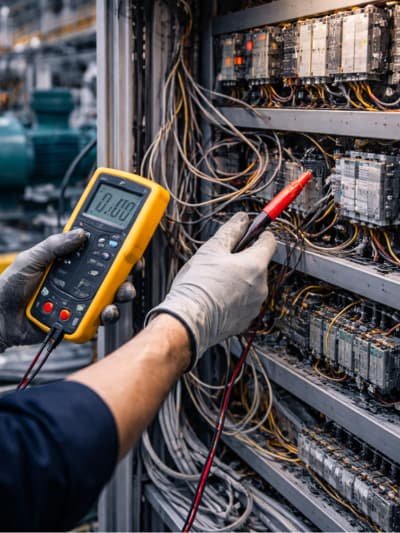
Common Problems During PLC Installation
Most early failures in PLC systems come from wiring, addressing, and integration issues. Understanding these problems is key for effective plc installation troubleshooting and maintenance.
- Incorrect 24 VDC polarity or missing commons: Can cause modules to malfunction or mimic software faults. Always verify polarity and common connections during installation.
- Loose terminals, poor crimping, wrong ferrule sizes: May lead to intermittent I/O failures or communication drops. Tightening and proper termination are essential.
- I/O wired to the wrong channel vs. the I/O list: Mismatched wiring triggers false alarms or incorrect system behavior. Cross-check with the I/O list.
- Module order mismatch in hardware configuration: Can cause the PLC to report errors or fail to recognize modules. Verify module placement and configuration.
- Wrong analog scaling (4–20 mA vs. 0–10 V): Leads to inaccurate readings or control responses. Confirm scaling settings match the I/O type.
- Noise symptoms (input flicker, communication drops under load, analog drift): Often caused by poor grounding or cable routing near power lines. Proper segregation reduces interference.
- Duplicate IP addresses or incorrect network settings: Can destabilize communication and cause random faults. Verify network configuration during commissioning.
- Interlocks and alarms not aligned with real operating sequence: Misconfigured interlocks can trigger unnecessary shutdowns. Ensure all interlocks and alarms match operational logic.
Power Supply and Grounding Issues in PLC Systems
Grounding and EMC discipline help reduce false signals and random faults. Many PLC “software problems” are actually power or grounding issues in the field. Always follow your platform’s OEM guidance for grounding, shielding, and cable routing.
Power Integrity Checks You Can Document
- Measure 24 VDC under idle and I/O load: Ensures modules receive stable voltage and prevents intermittent faults.
- Re-check during motor or VFD starts: Voltage drops under load can trigger unexpected CPU or I/O errors.
- Log undervoltage events, loose terminals, or undersized/aging PSUs:
Helps identify recurring problems before they affect production.
Maintaining disciplined routing and proper bonding prevents noise and communication issues, especially when VFDs are nearby.
How to Troubleshoot a PLC That Is Not Responding
When a PLC stops responding, follow a structured PLC Troubleshooting and Maintenance approach: start with hardware indicators, then check communications, and finally software diagnostics. This method reduces downtime and avoids guesswork.
Step-by-Step Checks:
- Observe: Check CPU and communication module LEDs for error patterns.
- Confirm: Ensure stable control power and correct polarity.
- Verify: Inspect the communication path (IP, subnet, cabling).
- Review: Analyze controller diagnostics (fault buffer, module diagnostics, comm errors).
- Recover: Recover safely without random resets; document firmware and project versions.
Read About: SCADA Systems: Industrial Monitoring & Control Solutions
Preventive Maintenance for PLCs in Industrial Plants
Preventive maintenance aims to stop faults before they occur. Regular checks reduce downtime and improve reliability.
Typical Checks:
- Panel Condition: Inspect for dust, corrosion, and loose terminals.
- Cooling: Ensure filters and fans are clean and temperature is stable.
- Power Integrity: Verify PSU output under load.
- Grounding/EMC: Check bonding continuity and terminations.
- Backups: Keep the latest project backup and update as-builts.
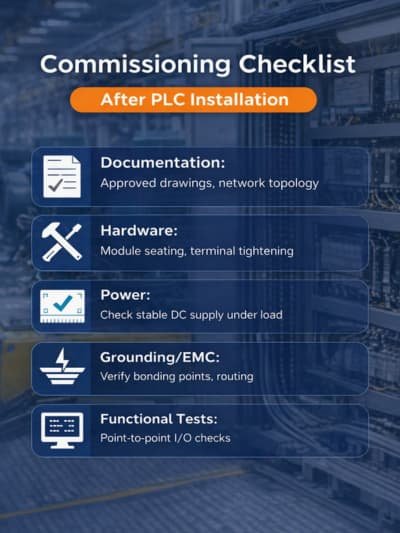
Commissioning Checklist After PLC Installation
Commissioning should be repeatable, fully documented, and signed off to ensure reliable operation.<
Key Steps
- Documentation: Approved drawings, I/O list, and network topology.
- Hardware: Verify module seating, labeling, and terminal tightening.
- Power: Check stable DC supply under load and correct commons.
- Grounding/EMC: Ensure bonding points are correct and routing is verified.
- Software: Confirm hardware configuration, I/O mapping, and validate alarms/trips.
- Functional Tests: Perform point-to-point I/O checks, interlocks/permissives, and fail-safe behavior.
Why Choose RETQAN for Your PLC Services
At Riyadh Al Etqan (RETQAN) we don’t just fix faults; we stabilize your production. We bridge the gap between complex automation and field reliability through:
- Data-Driven Diagnostics: We identify the Root Cause to eliminate recurring downtime, not just the symptoms.
- OEM-Standard Execution: Precision grounding and EMC practices that strictly follow manufacturer guidelines.
- Actionable Documentation: You receive full commissioning reports and updated as-builts for total traceability.
- Local Precision:Specialized expertise tailored to the unique industrial conditions of Saudi Arabia.
Conclusion
Reliable operation of industrial control systems depends on structured processes, careful verification, and disciplined documentation. Following best practices for installation, grounding, diagnostics, and commissioning ensures smooth and predictable production, reducing downtime and enabling engineers to respond confidently to any operational challenges.
FAQ
How often should I perform preventive maintenance on a PLC?
Set the interval based on OEM documentation and your site environment. In higher-stress environments, increase inspection frequency for power, grounding, and cabinet condition, then adjust based on recorded findings.
Can grounding issues cause PLC communication drops?
Yes. Grounding, shielding, and routing are critical. Poor EMC practice can contribute to interference and unstable signals. The correct fix depends on the OEM platform and installation method.
What is the safest first action when the PLC is not responding?
Place the process in a safe state per site procedures. Then use status indicators and diagnostics to identify whether the issue is power, CPU state, I/O fault, or communications.