
SCADA troubleshooting becomes urgent when operators lose visibility, alarms stop, or trends disappear during live operations. In Saudi Arabia’s industrial facilities, SCADA systems usually connect multiple layers: field devices, PLCs/RTUs, networks, servers, historian, and HMI clients. A fault in any layer can appear as the same symptom: “no data.” This article serves as a SCADA troubleshooting guide, covering how to test a SCADA system safely, common problems and solutions, communication issues, best practices, and preventive maintenance using documented checks and controlled change.
What is SCADA Troubleshooting?
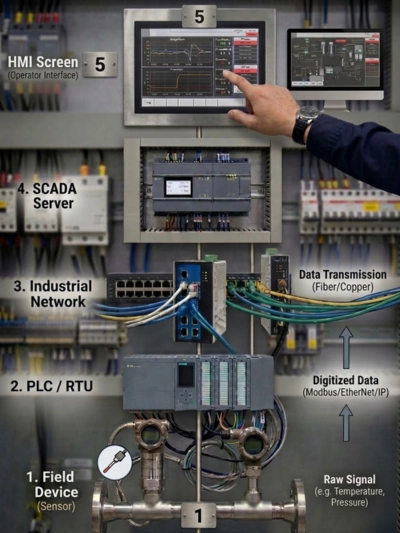
SCADA troubleshooting is the process of identifying why a supervisory control and data acquisition system is not performing as expected. It focuses on verifying the full data path: field signal → controller (PLC/RTU) → network → SCADA server/services → database/historian → HMI screens and alarms.
A practical troubleshooting scope often includes:
- Confirming what is affected: one site, one PLC, one screen, or the full system.
- Separating symptoms: missing values, bad quality, alarms not triggering, slow updates, or login/service failures.
- Checking time and events: what changed before the issue appeared (network changes, patching, configuration edits).
- Reviewing diagnostics: server logs, driver logs, and controller communication status.
A good troubleshooting record should include the time of occurrence, affected assets, error messages, and the actions taken. This supports repeatable fixes and reduces repeated trial-and-error.
How to Test a SCADA System?
Before starting any SCADA troubleshooting activity, engineers must verify that the system is safe to test and that operational risks are controlled. Effective SCADA troubleshooting steps start with following site safety rules and access controls. Begin with read-only verification before making configuration changes.
A structured SCADA test checklist can include:
- Server health: CPU/RAM/disk usage, service status, backup status, and time synchronization.
- Network reachability: confirm allowed paths between SCADA server and PLC network segments (as defined by policy).
- Driver status: confirm communication drivers are running and stable (OPC UA/Modbus TCP/EtherNet/IP/PROFINET gateways, etc.).
- Tag quality sample: select a controlled set of tags and verify update rates and quality status.
- Alarm test: confirm a safe test method for alarm triggers and notifications (without disturbing operations).
- Historian/trends: confirm data logging is active and time-stamps are consistent.
Where functional tests are needed, agree on success criteria in advance and record signed test results if the project requires formal acceptance.
Common SCADA Problems and Solutions
Most SCADA faults fall into known patterns that can be verified quickly. Common SCADA problems often appear as “no data,” “bad quality,” delayed updates, or alarm issues. The correct solution depends on where the failure occurs in the chain.
Examples of common problems with practical verification steps:
| Symptom | Root Cause / Verification Steps |
|---|---|
| SCADA services stopped | Verify service status and system event logs, then follow approved restart procedures. |
| Database/historian issues | Check disk space, database status, and logging queues; confirm backup integrity. |
| HMI client issues | Validate user permissions, screen scripts, and client connectivity to the server. |
| Tag mapping errors after changes | Confirm tag addresses, scaling, and driver configuration versions. |
| Time sync mismatch | Confirm site time design (NTP/PTP) and verify alignment across servers and controllers. |
Avoid assuming the root cause. Confirm with evidence: logs, service status, network counters, and controller diagnostics.
For hardware-level failures, use our structured guide: [Advanced PLC Fault Finding Techniques].
SCADA Communication Issues
SCADA Communication problems should be checked from the physical link to the application protocol. SCADA communication issues are common because systems rely on multiple devices and network rules. Symptoms can include intermittent disconnections, bad-quality tags, or one area working while another fails.
Documented checks typically include:
- Verify controller side first: confirm PLC/RTU is healthy and the correct communication interface is enabled.
- Confirm network identity: IP/subnet, device naming, and duplicate IP checks on the relevant subnet.
- Switch/VLAN validation: confirm ports and VLANs match the network design; review link drops and error counters.
- Firewall rules: confirm allowed ports and routes between SCADA servers and controller networks.
- Driver/protocol checks: confirm endpoints, certificates (OPC UA), unit IDs (Modbus), and session limits where applicable.
If engineering laptops connect but SCADA cannot, the issue is often server-side routing, VLAN/firewall restrictions, driver configuration, or tag addressing rather than the PLC itself.
If the SCADA cannot reach the controller, follow this diagnostic flow: [Is your PLC Not Communicating?]

Best Practices for SCADA Troubleshooting
Best practices focus on repeatability, controlled change, and clear documentation. A troubleshooting approach improves when teams standardize what to record and how to verify. This reduces escalation time and supports faster restoration.
Best practices that are commonly used include:
- Use a standard incident template: symptom, scope, timeline, evidence, action taken, and verification result.
- Change one variable at a time and record before/after results.
- Maintain version control for SCADA projects, drivers, and configuration exports.
- Keep a controlled list of critical tags and screens for quick verification tests.
- Align alarm practices with an alarm management approach to reduce nuisance alarms and missed alarms.
Many sites reference alarm management frameworks such as ISA-18.2 to structure alarm lifecycle controls. The exact governance should be defined in site procedures and verified with operations needs.
SCADA Preventive Maintenance
Preventive maintenance is strongest when it targets known failure points and keeps evidence. SCADA preventive maintenance aims to reduce unexpected downtime by checking health indicators, backups, and configuration integrity before failures occur. It should be planned with IT/OT policies and site access rules.
The SCADA market in Saudi Arabia is expected to grow steadily over the next decade, highlighting the increasing complexity and criticality of SCADA systems in the region. This makes robust preventive maintenance strategies essential for industrial facilities in Riyadh, Jeddah, Dammam, Jubail, and Yanbu.
A practical preventive maintenance checklist can include:
- Confirm backups of SCADA servers and databases and test restore procedures where permitted.
- Review disk space, CPU/memory trends, and critical service availability.
- Check time synchronization status and correct drift where applicable.
- Review communication health: driver status, error counters, and link stability.
- Audit user accounts and permissions periodically according to site policy.
- Review patching/antivirus policy alignment for OT environments (as defined by the site).
For cybersecurity governance in industrial automation, many organizations reference IEC 62443 principles. Maintenance actions should match the site’s approved OT security policy and change management workflow.
Eliminate data noise and ‘Bad Quality’ tags at the source: [PLC Panel Earthing ].
Why Contact Us for SCADA Services?
Service support is most valuable when it is evidence-based and aligned with site procedures. If SCADA issues are recurring or if your site needs commissioning support, structured troubleshooting and documentation can reduce repeated downtime events. Riyadh Al-Itqan Company (R-Aletqan) supports industrial clients with monitoring systems (SCADA/HMI) and integration work that often interfaces with PLC and DCS environments.
Typical support outcomes include:
- A documented troubleshooting workflow with clear findings and verification steps.
- Communication and driver configuration review aligned with the system architecture.
- Alarm and notification verification support based on approved test methods.
- Preventive maintenance planning and checklists aligned with site policies.
- As-built documentation support and controlled configuration exports for handover.
Conclusion
SCADA stability improves when testing and maintenance are planned and documented. SCADA troubleshooting is more effective when teams follow a layered method: verify controllers, confirm networks, validate drivers, and review server services and logs. With preventive maintenance and controlled changes, sites reduce repeat incidents and improve response time.
To review our capability presentation and discuss your SCADA symptoms, contact Riyadh Al-Itqan Company to book a discussion and request a quotation. We provide expert SCADA troubleshooting services in Riyadh, industrial control system maintenance in Jeddah, SCADA communication issue resolution in Dammam, and comprehensive automation system support across Saudi Arabia, including major industrial hubs like Jubail and Yanbu. Our team ensures your systems are resilient and optimized for performance.
FAQ
How do I know if the SCADA system is truly down or just experiencing a communication glitch?
First, check the SCADA server’s health (CPU, RAM, network connectivity) and service status. Then, verify communication drivers and network paths to the PLCs/RTUs. If field devices are still operational but data isn’t reaching the HMI, it’s likely a communication issue. A full system shutdown would typically show broader failures across multiple components.
What are the most common causes of SCADA communication failures in Saudi Arabian industrial plants?
In Saudi Arabia, common causes include network infrastructure issues (e.g., fiber optic cuts in remote areas, misconfigured switches in industrial zones like Jubail or Yanbu), firewall restrictions, incorrect IP addressing, and environmental factors affecting wireless links. Regular network audits and adherence to robust cybersecurity policies are crucial.
Can SCADA troubleshooting help prevent costly downtime?
Yes, when troubleshooting is documented and used to remove repeat causes. The value comes from identifying patterns (recurring link drops, driver timeouts, service failures) and applying controlled corrective actions with verification evidence.