
VFD overheating occurs when a drive operates beyond its thermal capability because of high ambient temperature, insufficient panel cooling, dust contamination, restricted airflow, incorrect enclosure design, excessive motor loading, or electrical stress. In Saudi industrial environments, heat exposure and dust can make these conditions more severe, especially in outdoor, rooftop, utility, and process-area installations. Engineers should first record the drive alarm, ambient and panel temperature, load current, cooling condition, installation environment, and recent operating changes before adjusting parameters or replacing the drive.
Quick Answer: Why Does a VFD Overheat?
A VFD overheats when the heat generated by switching losses, current flow, and connected components cannot be transferred away fast enough. Thermal limits depend on the drive design, load profile, switching frequency, ambient temperature, enclosure, airflow, and installation method. High temperature can reduce output capability or trigger a VFD high temperature fault. Dust can block filters and heat sinks, while overload, repeated acceleration, poor ventilation, or harmonic stress can increase heat generation. The exact operating and derating limits must be taken from the drive’s model-specific technical documentation.[1]
Common Causes of VFD Overheating in Industrial Plants
High Ambient Temperature and Thermal Derating
The surrounding air temperature affects heat dissipation. Direct sun, nearby furnaces, hot utility rooms, and adjacent heat-producing equipment can make panel temperature exceed the plant-room reading. Outdoor installations may also require protection from solar loading.
Drive derating temperature refers to reducing allowable output current or power when ambient or internal temperature exceeds the model’s no-derating range. Compare measured conditions and duty with the exact manual, including altitude, overload duty, switching frequency, clearances, and enclosure arrangement. Do not apply a percentage from another model.
Poor VFD Panel Cooling
Poor VFD panel cooling can result from incorrect fan direction, blocked filters, restricted passages, hot-air recirculation, failed thermostats, dirty impellers, or insufficient clearances. Inspect fans, guards, louvers, heat exchangers, air conditioners, and baffles; a rotating fan may still deliver inadequate airflow.
Size cooling for the total enclosure heat load, including reactors, braking resistors, contactors, and power supplies. Sealed dusty enclosures may need a closed-loop heat exchanger or air conditioner. Match the method to the enclosure, environment, and maintenance capacity.
Dust Contamination Inside VFD Panels
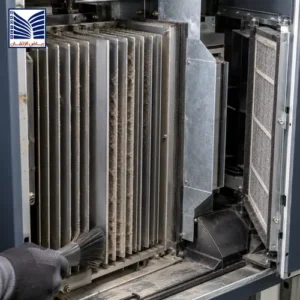
Dust can coat heat sinks, block filters and vents, contaminate circuit boards, and reduce forced-air cooling. Conductive or corrosive dust may also affect insulation and connections. Inspect filters, heat sinks, fans, air paths, and seals at an interval suited to the site and criticality. Clean only under the drive manufacturer’s safe maintenance method; recurring contamination may indicate an enclosure, filtration, pressurization, or location problem.
Motor Overloading and Excessive Current Demand
A drive may overheat when the motor requires excessive current because of process load, friction, blocked pumps, tight bearings, misalignment, belt problems, poor lubrication, incorrect motor data, frequent acceleration, or a changed duty cycle. Compare current, speed, torque where available, acceleration time, overload events, and process condition. Determine whether current is high continuously, during acceleration, at low speed, or after a process change. Do not raise current limits before investigating the mechanical cause.
Incorrect VFD Selection or Installation
Application mismatch can create overheating even when the drive is new. Review motor voltage, current, power, frequency, duty type, overload requirement, braking, cable length, switching frequency, harmonic conditions, bypass arrangement, mounting clearances, and enclosure rating. Installation requirements may also include separation from heat sources, vertical orientation, airflow clearance, cable routing, grounding, and protection coordination.
Check whether the drive is installed in an enclosure that traps heat, exposed to an environment outside its rating, or mounted too close to another heat source. Confirm that ventilation openings and cooling accessories match the design. A recurring VFD overheating cause should be traced to the application, installation, cooling, load, or maintenance layer rather than attributed to the drive without evidence.
VFD Overheating Troubleshooting Checklist
Use this checklist to separate environmental, installation, cooling, loading, and maintenance causes before corrective action.
| Check Area | What Engineers Should Review |
|---|---|
| Ambient temperature | Measure the actual air temperature at the drive intake and compare it with the model-specific operating range. |
| Panel ventilation | Check intake, exhaust, clearances, hot-air recirculation, enclosure layout, and total heat load. |
| Cooling fans | Verify operation, direction, voltage, airflow, bearing condition, alarm feedback, and replacement history. |
| Filters | Inspect blockage, filter type, cleaning interval, pressure drop, and dust loading. |
| Heat sinks | Check contamination, airflow across fins, thermal alarm history, and safe cleaning condition. |
| Load current | Compare phase current, overload events, acceleration current, speed, torque, and process duty. |
| Motor condition | Investigate friction, blocked equipment, bearings, alignment, lubrication, and mechanical load changes. |
| Parameter settings | Review motor data, switching frequency, overload settings, acceleration, control mode, and thermal model. |
| Installation environment | Check sun exposure, enclosure rating, humidity, corrosive or conductive dust, altitude, and nearby heat sources. |
Record the alarm code, time, operating state, temperature, current, speed, process condition, and recent maintenance or parameter changes. Trend comparison is more useful than a single reading because overheating may appear only during peak load or the hottest part of the day.
How Saudi Industrial Conditions Affect VFD Reliability
Saudi industrial sites may expose drives to high heat, dust, solar loading, temperature changes, and demanding utility or process duty. Conditions vary by location, so measure the actual environment rather than rely on generic climate statistics. An outdoor MCC, rooftop package, compressor area, and air-conditioned control room have different thermal risks.
Select and maintain the enclosure as a system. Seals, cable glands, filters, doors, and cooling interfaces must remain effective. Air-cooled panels may lose performance as filters load; closed-loop cooling reduces dust ingress but adds heat-exchanger or air-conditioner maintenance. Connect environmental readings with alarms, load trends, fan condition, filter history, and maintenance records.
VFD Panel Cooling Best Practices
Begin with a heat-load or equipment-specific thermal assessment. Confirm heat sources, intake and exhaust paths, recirculation, and required clearances. Keep cable ducts, barriers, and adjacent equipment from blocking airflow.
Inspect fans and filters according to dust exposure and criticality. Clean or replace filters using a documented method, verify airflow, and check fan alarms and thermostatic control. Monitor intake, panel, heat-sink, and exhaust temperatures where relevant, then compare them with current and alarm trends. Repair seals and validate cooling under representative load.
Understanding VFD Derating Requirements
Derating means reducing the allowable drive output or duty when an installation condition reduces the thermal or electrical margin. Temperature is one cause, but altitude, switching frequency, overload duty, enclosure arrangement, and installation configuration may also affect the permissible load. Derating can mean that a drive selected by motor nameplate current is no longer adequate for the measured environment and duty.
Manufacturers specify installation limits because semiconductor devices, capacitors, heat sinks, fans, insulation, and other components have defined operating conditions. The correct calculation uses the exact model manual and the actual installation, including ambient temperature, mounting, airflow, duty cycle, and required overload. Do not quote a universal temperature or current value, and do not remove a thermal alarm through parameter changes without confirming the design basis.
Preventive Maintenance Checks to Reduce VFD Overheating
- Inspect cooling paths: Check intake and exhaust openings, clearances, heat sinks, baffles, and recirculation.
- Check ventilation components: Test fans, filters, thermostats, heat exchangers, air conditioners, and alarm contacts.
- Review operating temperature: Measure panel and intake temperature under representative load and record daily or seasonal patterns.
- Inspect electrical connections: Under an approved safe-work procedure, check for loose or discolored connections, abnormal heating, and correct terminations.
- Verify motor loading: Compare current, speed, torque, acceleration, process demand, and mechanical condition.
- Record alarms and trends: Preserve fault codes, thermal warnings, current trends, temperature readings, and maintenance actions.
- Plan corrective actions: Assign an owner, evidence requirement, priority, and verification test for each defect.
The maintenance record should distinguish a temporary alarm reset from a verified correction. A drive that returns to service after cooling down may still have an unresolved environmental, load, or installation problem.
When Should a VFD Be Inspected or Replaced?
Inspect the drive when it shows repeated thermal alarms, abnormal fan behavior, rising temperature at the same load, contamination, unexplained current increase, or a change in the enclosure or process. Review age, repair history, spare availability, application criticality, thermal trend, and the condition of power components before choosing replacement.
Replacement may become reasonable when the drive is no longer supportable, has repeated component failures, cannot meet the application duty, or would require major repair without a reliable recovery path. Repair or cooling correction may be appropriate when the drive is technically supportable and the root cause is external. The decision should compare evidence, risk, testing requirements, outage constraints, and future reliability needs—not rely on age alone.
How Engineering Support Helps Diagnose VFD Overheating
Technical support can perform thermal inspection, cooling assessment, electrical checks, load analysis, parameter review, enclosure evaluation, and reliability planning. The work may include comparing alarms with current and temperature trends, reviewing motor and application data, checking fans and filters, assessing derating conditions, examining installation clearances, and defining corrective-action tests.
A structured VFD troubleshooting solutions review can separate environmental, installation, cooling, loading, and maintenance causes. It should produce observations, test records, priorities, and a recommendation based on the actual drive model and plant conditions.
Frequently Asked Questions
What are the main causes of VFD overheating?
The main causes include high ambient temperature, thermal derating, poor panel airflow, failed fans, blocked filters, contaminated heat sinks, motor overload, frequent acceleration, mechanical resistance, incorrect drive selection, unsuitable enclosure design, and electrical stress. Start by measuring temperature and current, checking cooling components and dust, reviewing the duty cycle, and comparing conditions with the exact drive documentation before changing parameters.
How does high temperature affect VFD performance?
High temperature reduces the thermal margin of the drive and may require output-current or duty derating according to the model documentation. It can increase the likelihood of a high-temperature alarm or trip and may accelerate aging of fans, capacitors, insulation, and other components. The effect depends on the exact drive, enclosure, airflow, load profile, switching frequency, and installation environment, so universal limits should not be assumed.
Can dust cause a VFD to overheat?
Yes. Dust can block filters and vents, coat heat sinks, reduce fan airflow, contaminate circuit boards, and impair enclosure cooling. Conductive or corrosive dust may also create electrical reliability risks. Inspect the internal airflow path, filters, heat sinks, seals, and cooling accessories according to a safe maintenance procedure. If contamination returns quickly, review enclosure selection, pressurization, filtration, location, and maintenance frequency rather than only cleaning the drive.
What should be checked when a VFD shows a high temperature fault?
Record the fault code, operating time, ambient and panel temperature, output current, speed, load condition, and recent changes. Check fans, filters, heat sinks, clearances, hot-air recirculation, enclosure seals, motor loading, acceleration, switching frequency, and parameter data. Compare the installation with the exact technical manual. Do not repeatedly reset the alarm or raise limits until the thermal cause and required corrective action are understood.
How can VFD panel cooling be improved?
Improve cooling by correcting airflow direction, restoring clearances, cleaning or replacing filters, repairing fans, preventing hot-air recirculation, reducing nearby heat sources, and selecting an enclosure cooling method suited to dust and moisture exposure. For sealed panels, a properly maintained heat exchanger or air conditioner may be required. Validate the improvement under representative load by trending temperature and current, and follow the drive and enclosure documentation.
When should a VFD be replaced instead of repaired?
Replacement should be evaluated when the drive is unsupported, thermal alarms recur after verified external causes are corrected, power components fail repeatedly, the application duty exceeds the drive capability, or reliable spares and recovery are unavailable. Repair or cooling correction may be suitable when the drive remains supportable and the root cause is external. Compare criticality, repair history, test requirements, outage constraints, and lifecycle risk before deciding.
Request a VFD Overheating Inspection and Reliability Assessment
Request a VFD overheating inspection, drive troubleshooting assessment, cooling-system review, or reliability-improvement support when thermal alarms, dust contamination, load changes, or panel-temperature concerns affect your plant. A technical assessment can evaluate the installation environment, cooling path, current demand, motor condition, parameters, and derating basis before corrective action. Use the contact technical support page to discuss the required scope.
A disciplined approach to VFD overheating helps Saudi industrial teams identify whether the root cause is environmental, installation-related, cooling-related, electrical, or maintenance-related before repairing or replacing equipment.